| Home | Contents | Start | Prev | 1 | 2 | 3 | 4 | 5 | 6 | 7 | 8 | 9 | 10 | 11 | 12 | 13 | 14 | 15 | 16 | 17 | 18 | 19 | 20 | 21 | 22 | Next |
Phase 1: Traversing a Virtual Map
The aim here is to model the real world in a virtual map including obstacles. Implement a CPP algorithm to generate a suitable mowing path and then display this on the screen. Much of this will involve setting up the environment and ensuring the software is modulatized appropriately. Search algorithms will go into one package and grid-building functions into another.
Initial development is on my computer using a virtual environment for python packages (called venv). It was later sent to kupePi and duplicated there.
Here are the Phase 1 aims:
- Represent lawn as a virtual map
- Consider map representatiion (cartesian,compass, python)
- Ideally, use real measurements and scale for grid granularity (different sized robots)
- Simple Grid CPP - extend to accommodate obstacles leaving holes in the pattern
- Display CPP visually
- Get this working on the Pi
Here is the software package structure:
lib/grid_generation:
total 16
-rw-r--r--@ 1 clivejor  staff   81 30 Apr 19:10 __init__.py
drwxr-xr-x@ 4 clivejor  staff  128 30 Apr 19:15 __pycache__
-rw-r--r--@ 1 clivejor  staff  846 30 Apr 19:14 grid_maker.py

lib/search_algorithms:
total 24
-rw-r--r--  1 clivejor  staff   40 22 Apr 22:52 __init__.py
drwxr-xr-x  4 clivejor  staff  128  1 May 21:05 __pycache__
-rw-r--r--@ 1 clivejor  staff  814  1 May 21:05 cpp_search.py
-rw-r--r--@ 1 clivejor  staff   44 24 Apr 12:27 README.md

lib/tests:
total 16
-rw-r--r--@ 1 clivejor  staff   255  1 May 21:16 grid_cpp_test.py
-rw-r--r--@ 1 clivejor  staff  1080 30 Apr 19:40 grid_maker_test.py
Here is some pseudocode of the approach taken:
import numpy, matplotlib, grid_generation, search_algorithms

#width and height are in metres. resolution is grid resolution (eg 0.2) Determined by robot footprint
grid, resolution = generate_grid(width, height, resolution)
add_obatacles(grid, resolution, obstacle_dimensions)
cpp_path = generate_cpp_search_path(grid)
plot(grid, cpp_path)
|
Here is the resulting plot
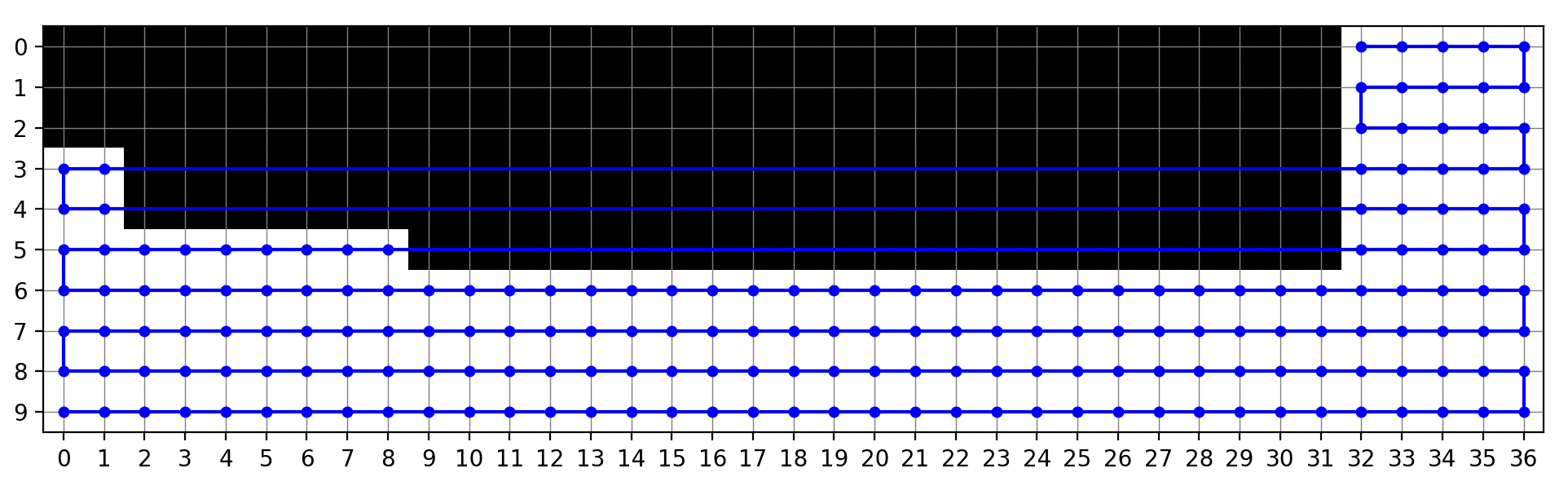
We see that the path generated by the CPP algorithm is a horizontal mowing pattern, traversing left to right and then back again. When an obstacle is in the way (as in at the top of the pattern), it will not try to traverse it. When there is an obstacle in the middle, it skips across it and continues the CPP mowing pattern on the other side. At this stage we have nothing to get it from one side of the obstacle to the other. This will be tackled in the next phase.
This was implemented on my computer but all the code was transferred to kupePi and the results were the same (yay for dev environments!).
May 2026
| Home | Contents | Start | Prev | 1 | 2 | 3 | 4 | 5 | 6 | 7 | 8 | 9 | 10 | 11 | 12 | 13 | 14 | 15 | 16 | 17 | 18 | 19 | 20 | 21 | 22 | Next |